Reveal.js
An html presentation framework I recommend
A design made with ❤️ for
SNUPHEL Members
Today:
Session:
Navigation Tips
Keyboard Controls
- Space / Arrow keys - Navigate slides
- S - Speaker notes view
- O or ESC - Overview mode
- Alt + Click - Zoom in
- F - Fullscreen
- B or . - Pause (blackout)
Important!
Use spacebar to navigate to ensure you don't miss vertical slides.
This presentation uses vertical slides - look for the down arrow ↓
Try pressing 'O' now to see the overview of all slides
Presentation Outline
- Motivation - Why choose Reveal.js for academic presentations?
- Features - What makes this template special?
- Development - How to create and customize your presentation
- Deployment - Publishing with GitHub Pages
- Contributions - How this template was developed
- Discussion - Q&A and future directions
Motivation
- Web-based content is flexible and easy to share
- Better integration with AI tools like Claude and ChatGPT
- Provides professional look for academic presentations
- Easy to version control with Git
- Supports multimedia content better than traditional tools

Reveal.js logo
Comparison with Other Presentation Tools
| Feature | PowerPoint | Google Slides | LaTeX Beamer | Reveal.js |
|---|---|---|---|---|
| Cross-platform | Partial | Yes | Yes | Yes |
| Version Control | Limited | Limited | Good | Excellent |
| Web Publishing | Limited | Good | Limited | Excellent |
| Interactive Elements | Limited | Limited | Poor | Excellent |
| Customizability | Moderate | Limited | Good | Excellent |
Comparison of presentation platforms for academic use
Template Features
- Responsive design - Works on all devices and screen sizes
- Modern typography with Google Fonts
- Presenter notes - Press 'S' to access
- Interactive elements like image comparisons and code highlighting
- Easy customization with CSS variables
- Flexible layouts with grid and container components
Presenter View
- Press S key to open presenter view
- Shows current slide, next slide, and notes
- Includes timer and speaker controls
- Works across devices with presenter link
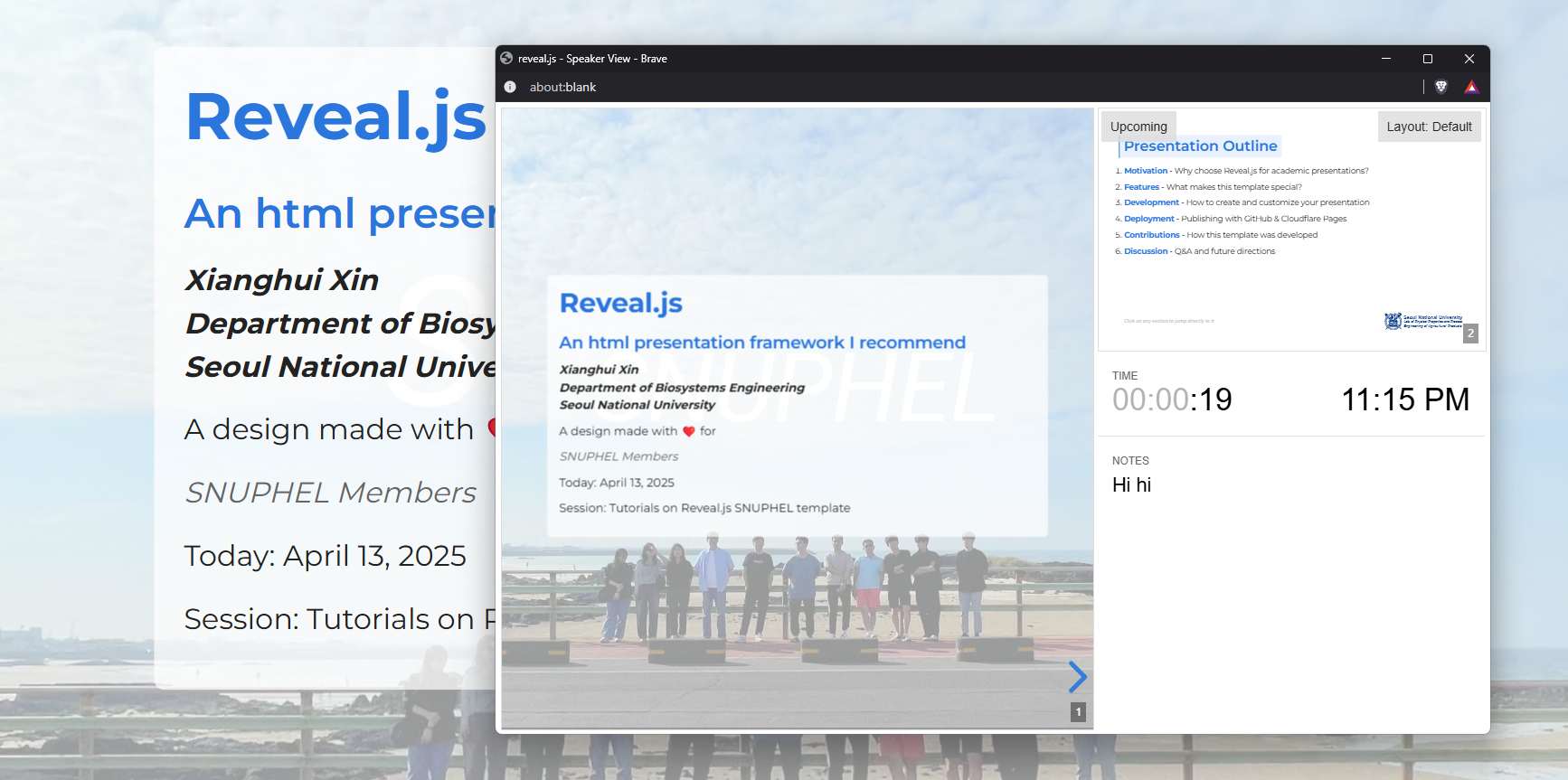
Example of Reveal.js presenter view
Math Formulas with KaTeX
- Include RevealMath.KaTeX plugin
- Write inline math with $\LaTeX$ syntax
- Create complex equations
- Renders faster than MathJax
Example equation:
$$E = mc^2$$
$$\frac{d}{dx}\left( \int_{a}^{x} f(u)\,du\right)=f(x)$$
Einstein's theory of relativity and the Fundamental Theorem of Calculus
Markdown Support
| Feature | HTML | Markdown |
|---|---|---|
| Headers | <h1>...</h1> | # Header |
| Lists | <ul><li>...</li></ul> | * Item |
| Links | <a href="...">...</a> | [text](url) |
| Images | <img src="..." alt="..."> |  |
| Code | <pre><code>...</code></pre> | ```lang code``` |
Write slides in Markdown for faster content creation
<section data-markdown>
  <textarea data-template>
    # Slide Title

    * Bullet point 1
    * Bullet point 2

    ---

    ## Next Slide

    ```javascript
    let code = "highlighted";
    ```
  </textarea>
</section>Interactive Code Examples
- Syntax highlighting for all programming languages
- Line highlighting for focusing attention
- Copy-paste functionality
- Perfect for teaching and tutorials
// Initialize Reveal.js with options
Reveal.initialize({
  hash: true,
  slideNumber: true,
  progress: true,
  // Transition style
  transition: 'slide',
  // More configuration options...
  plugins: [ RevealMarkdown, RevealHighlight ]
});
Example of code highlighting with line numbers
Embedded Web Content
- Embed any webpage with iframes
- Perfect for demos and interactive content
- Keeps your presentation self-contained
- Great for showing tools, applications, or supplementary material
<iframe
  src="https://example.com"
  width="600"
  height="400">
</iframe>
Media: Video Support
- Native HTML5 video support
- Easily embed video in your presentations
- Controls for playback
- Video can be paused during presentations
- Perfect for demos and tutorials
<video
  data-autoplay
  src="path/to/video.mp4"
  controls
></video>
Example of embedded video in Reveal.js
Plugins: Chart
- Create dynamic charts in your presentations
- Based on Chart.js library
- Support for line, bar, pie charts and more
- Interactive with hover effects
- Customize colors, labels, and animations
Example of Chart.js integration
Plugins: Mermaid
- Create diagrams and flowcharts using text definitions
- Supports multiple diagram types: flowcharts, sequence, class, etc.
- Renders beautiful SVG diagrams dynamically
- Simple text-based syntax similar to Markdown
- Perfect for visualizing processes and relationships
flowchart LR
  %% Define a reusable class for consistent styling
  classDef common fill:#e0e0ff,stroke:#4b0082,stroke-width:1px,color:#000080;

  subgraph "Your Computer"
    direction TB
    client["Host with MCP Client
(Claude, IDEs, Tools)"]:::common

    subgraph "MCP Servers"
      direction LR
      A["MCP Server A"]:::common --> DataA[(Local Data Source A)]:::common
      B["MCP Server B"]:::common --> DataB[(Local Data Source B)]:::common
      C["MCP Server C"]:::common --> Web[(Web APIs)]:::common
    end
  end

  subgraph Internet
    Remote[(Remote Service C)]:::common
  end

  client -->|MCP Protocol| A
  client -->|MCP Protocol| B
  client -->|MCP Protocol| C

  DataA --> A
  DataB --> B
  Web   --> Remote
MCP architecture overview
Customized feature:Before-After Slider


Ground truth VS 3DGS rendered novel view (2023)
Development
Setting Up Your Environment
- Create a NodeJS Workspace in Coder
- Clone the template repository
- Install dependencies with
npm install - Start the dev server with
npm start - Edit files in your preferred code editor
- Changes appear instantly in browser
# Clone the repository
git clone https://github.com/phasheen/revealjs-snuphel

# Navigate to the directory
cd revealjs-snuphel

# Install dependencies
npm install

# Start the development server
npm start
Basic Slide Structure
- Each slide is a
<section>element - Vertical slides use nested sections
- Use HTML or Markdown for content
- Add notes with
<aside class="notes">
<section>
  <h2>Slide Title</h2>
  <ul>
    <li>Bullet point 1</li>
    <li>Bullet point 2</li>
  </ul>
  <aside class="notes">
    Speaker notes here
  </aside>
</section>Customizing Your Presentation
- Edit
custom/custom-scripts.jsto update presenter info - Change theme color in
custom/custom-styles.css - Add your own custom components
- Modify slide transitions and animations
// In custom-scripts.js
const presenterName = "Your Name";
const presenterDepartment = "Your Department";
const presenterUniversity = "Your University";
const presenterEmail = "[email protected]";
const sessionName = "Your Presentation Title";
/* In custom-styles.css */
:root {
--theme-color: #2a76dd; /* Change this color */
--theme-color-transparent-10: rgba(42, 118, 221, 0.1);
}Fragment Animations
Fragment Types
- fade-in
- fade-up
- fade-down
- fade-left
- fade-right
Code Example
<ul>
  <li class="fragment fade-in">fade-in</li>
  <li class="fragment fade-up">fade-up</li>
  <li class="fragment fade-down">fade-down</li>
  <li class="fragment fade-left">fade-left</li>
  <li class="fragment fade-right">fade-right</li>
</ul>
Highlight Fragments
The red blue green fragments.
Other Effects
grow
shrink
strike
fade-out
Export & Sharing
- Export to PDF for offline viewing
- Deploy to GitHub Pages for free hosting
- Share links with specific slide hash (#/2/3)
- Include print-pdf query parameter for PDF export
- Use
gulpto create a production build
PDF Export URL:
http://localhost:8000/?print-pdfShare Link:
https://localhost:8000/#/2/3Deployment with GitHub Pages
Why GitHub Pages?
- Free hosting for your presentations
- Integrated with Git workflows
- Automatic builds with GitHub Actions
- Custom domains with SSL certificates
- Easy collaboration with teammates
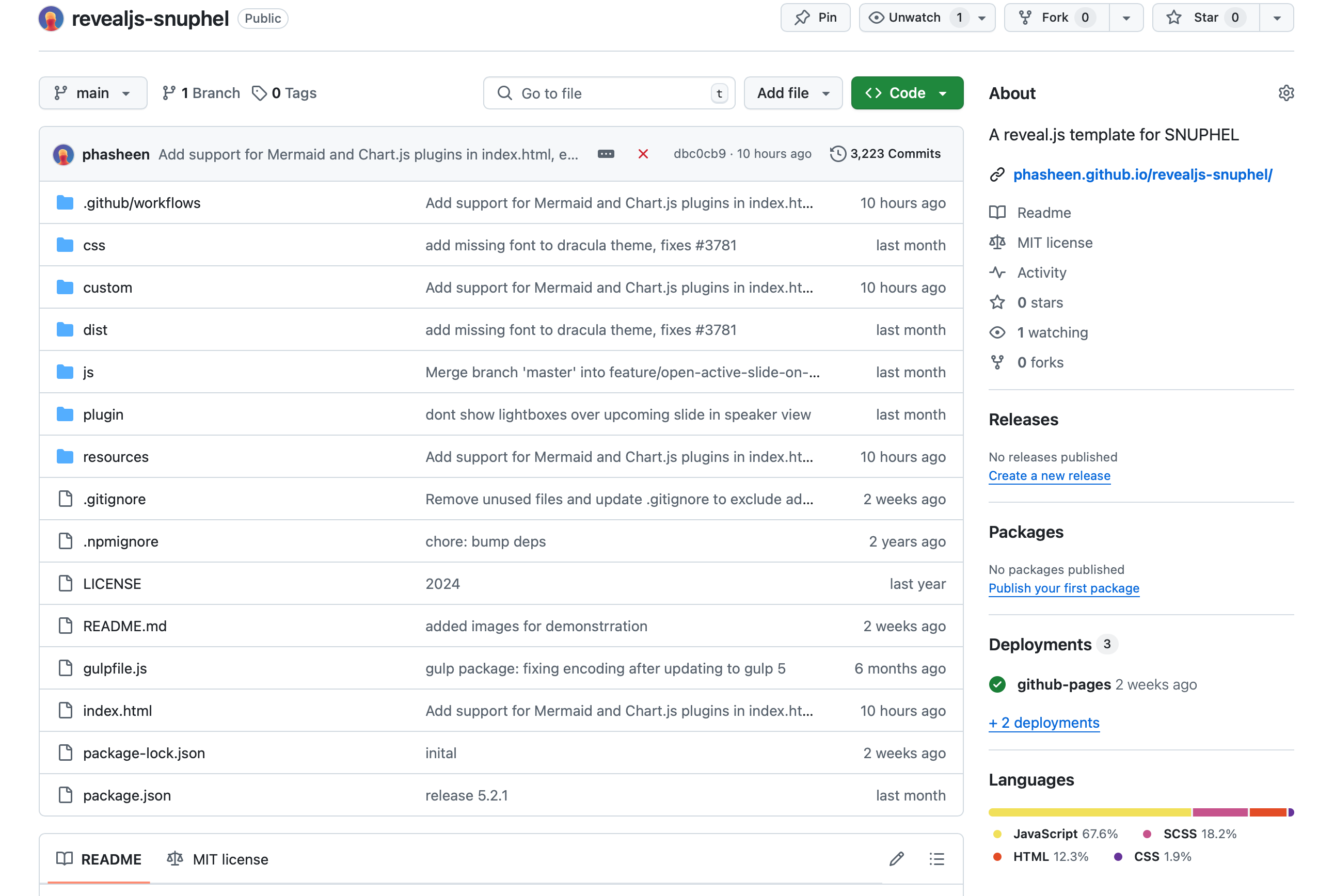
GitHub Pages deployment overview
GitHub Pages Setup
- Create a new GitHub repository
- Push your presentation files to the repository
- Go to repository Settings → Pages
- Set source to "GitHub Actions"
- The included workflow file will handle deployment automatically
# Initialize git in your project folder
git init

# Add all files
git add .

# Commit the changes
git commit -m "Initial commit of my presentation"

# Add remote repository
git remote add origin https://github.com/username/my-presentation.git

# Push to GitHub
git push -u origin main
GitHub Actions Workflow
- Included in the template as
.github/workflows/github-pages.yml - Automatically deploys on push to main branch
- No configuration needed
- Fast deployment (usually less than a minute)
name: Deploy to GitHub Pages

on:
  push:
    branches:
      - main

permissions:
  contents: read
  pages: write
  id-token: write

jobs:
  build:
    runs-on: ubuntu-latest
    steps:
      - name: Checkout
        uses: actions/checkout@v4

      - name: Setup Pages
        uses: actions/configure-pages@v4

      - name: Upload artifact
        uses: actions/upload-pages-artifact@v3
        with:
          path: '.'

      - name: Deploy to GitHub Pages
        uses: actions/deploy-pages@v4
GitHub Pages Deployment Flow
								flowchart LR
								%% Style definitions
								classDef local      fill:#f5f5f5,stroke:#333,stroke-width:1px,stroke-dasharray:5 5
								classDef githubRepo fill:#e0f7fa,stroke:#0288d1,stroke-width:1px
								classDef trigger    fill:#fff3e0,stroke:#fb8c00,stroke-width:1px
								classDef job        fill:#e8f5e9,stroke:#2e7d32,stroke-width:1px
								classDef pages      fill:#ede7f6,stroke:#5e35b1,stroke-width:1px
								classDef user       fill:#e8f5e9,stroke:#33691e,stroke-width:1px

								subgraph "Local Development"
								  direction TB
								  A1["Edit slides (MD/HTML)"]:::local
								  A2["Preview locally (live server)"]:::local
								  A3["Commit & push to origin/main"]:::local
								  A1 --> A2 --> A3
								end

								subgraph "GitHub Repository & Triggers"
								  direction TB
								  B1["Repo: revealjs-demo (main)"]:::githubRepo
								  B2["Event: push/pull_request"]:::trigger
								  B1 --> B2
								end

								subgraph "GitHub Actions Workflow"
								  direction LR
								  T1["Checkout code and setup"]:::job
								  T2["Build and test"]:::job
								  T3["Deploy to gh-pages"]:::job
								  T4["Cleanup workspace"]:::job
								  B2 --> T1 --> T2 --> T3 --> T4
								end

								subgraph "Publishing"
								  direction TB
								  B3["Branch: gh-pages"]:::githubRepo
								  T3 --> B3
								  P["GitHub Pages site"]:::pages
								  B3 --> P --> U["👀 Viewers"]:::user
								end

								%% Layout hint for 16:9
								class Local_Development,Github_Repository_Triggers,GitHub_Actions_Workflow,Publishing internal;
GitHub Pages automatic deployment workflow
Contributions
Template Development
- Created modern, clean design
- Implemented responsive layouts
- Added custom components:
- Image comparison slider
- Data tables with styling
- Image galleries
- Citation formats
- Organized code for maintainability
- Documented features and usage
Open Source & Community
- Template is freely available for academic use
- Contributions welcome via GitHub
- Based on the open-source Reveal.js project
- Developed specifically for SNUPHEL members
- Continuously improving based on feedback
Don't like the logo? Design your own!
Continuous Deployment
- Every push to your repository triggers a new build
- Preview deployments for pull requests
- Easy rollback to previous versions
- Deployment logs for troubleshooting
- Automatic optimization of assets
Discussion & Future Directions
Benefits
- Platform independence - works on any device
- Version control for tracking changes
- Collaboration through Git and GitHub
- Web native - interactive elements & media support
- Consistent styling across presentations
Future Enhancements
- Additional layout templates
- More interactive components
- Enhanced print stylesheets
- Better mobile optimization
- Integration with academic citation tools
- Template gallery for different disciplines